


Dominos Game Classic Dominoes
4.713.58K Reviews
App Specs
- Version
- 2.8.1
- Updated On
- License
- Free
- Downloads
- 5,000,000+
- Developer
- FIOGONIA LIMITED
- Categories
- Board
- Platform
- Android, iOS
Screenshots



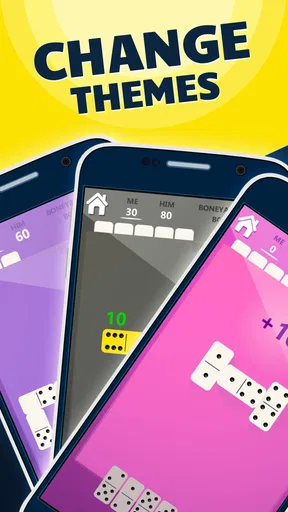



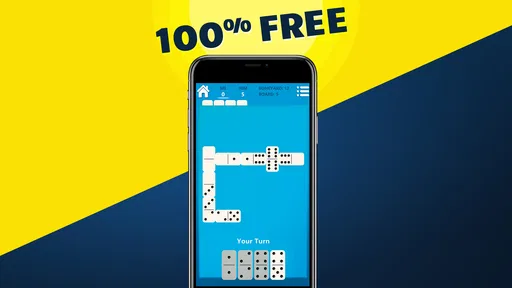
 Analysis by AppCompare
I like dominoes best when I can get into a game quickly, without finding a physical set or persuading someone nearby to play. Dominos Game Classic Dominoes suits that kind of casual session: it brings familiar tabletop play to a phone and offers several ways to approach a match. In my view, its strongest appeal is not novelty but convenience and choice. It is a straightforward board game for a spare moment, though players looking for a deep strategy campaign or a highly social gaming community may want something more specialised.
A practical fit for short breaks
The appeal is easy to understand on an ordinary day. I might have a few minutes before an appointment, or want something absorbing during a quiet evening without committing to a long session. Dominoes works well in those gaps because each turn asks for a small decision: which tile to play, what numbers to leave available, and whether to block or keep the line moving. A phone version removes the setup and tidying that come with a physical set, making it simple to start when the opportunity appears.
That convenience matters especially if you already know the rules. Instead of teaching everyone around a table or checking which tiles remain, the digital format keeps the play in one place. For a newcomer, the familiar tile-matching idea is also a gentle entry point into board games. I would still take a moment to learn the specific rules of each mode, since the scoring and tactical priorities can differ; knowing one version of dominoes does not automatically mean every variation will feel identical.
Choosing a mode changes the decisions
Block and draw dominoes may look similar at first, but they reward different habits. In a block game, I pay close attention to which numbers are becoming scarce and try not to leave myself with an awkward hand. Draw play gives a stuck player another route forward, so it can feel less restrictive, though the extra uncertainty makes planning harder. All-fives shifts attention toward the ends of the line and the score they create. Thinking about those differences before choosing a mode is a useful way to avoid treating every round as the same puzzle.
For a more deliberate session, I would pick one mode and play several rounds rather than switch after every match. That makes it easier to notice patterns in my own choices: perhaps I keep holding high-value tiles too long, or I overlook chances to control an open end. Switching modes is better when I want variety, while staying with one is better for learning its rhythm. This small choice helps the game serve both a quick distraction and a more focused practice session without needing a separate tutorial or elaborate setup.
What playing against the computer is good for
Solo play is useful when friends are busy or I have an unreliable internet connection, and it lets me concentrate on the decisions without coordinating a shared session. I would treat computer opponents as practice partners rather than assume they reproduce the habits of people I know. A predictable opponent can help me test basic tactics, but human players may bluff with their choices in a looser sense, adapt to my habits, or make surprising mistakes. If my goal is relaxed repetition, solo play is convenient; if the fun comes from reading another person, playing with friends is the better fit.
A practical tip is to use solo rounds to pay attention to the tiles that have already appeared. Even without memorising every move, noticing which numbers are common or absent can guide whether I keep a flexible tile or try to close off an end. I find that this makes a familiar game feel more thoughtful without turning it into homework. It is also a sensible way for a beginner to build confidence before joining a match with someone else.
Worth Reading Before You Choose

EA SPORTS FC Mobile 26 Is a Bigger Football Game, but It Takes Time

Flipboard Shows What News Apps Must Do Beyond the Feed

Switching to Android Auto Means Rethinking Your Driving Routine

Google Calendar Makes a Crowded Week Easier to Manage

Ludo King Makes the Most of the Minutes Between Plans

Baby Panda World Brings Quick Play to Modern Phones, but Its Game Library Feels Busy
Diving into the Gameplay
Right off the bat, I felt like I was transported back to my childhood days of sitting at the table with a real set of dominoes, minus the risk of knocking them over. The app offers a seamless digital version of the traditional game, and it’s incredibly easy to navigate. You don’t need to be a tech wizard to figure out the interface, which is a big plus if you ask me.
The game provides different modes, which is fantastic because who doesn’t love options? You can choose to play solo and test your skills against AI opponents or go head-to-head with friends in multiplayer mode. The AI is surprisingly smart, making solo games challenging yet fun. And if you’re in the mood to socialize, the multiplayer feature is a breeze to set up and play with friends from anywhere in the world.
Exploring Game Features
One of the highlights of the app is its variety of game modes. You’ve got your classic block, draw, and all-fives dominoes. Each mode offers a slight twist to the gameplay, keeping things fresh and engaging. I found myself switching between modes just to mix things up, and it definitely keeps the game from getting stale.
The app also boasts a vibrant and clean design. The graphics are sharp, and the colors are vivid, which makes playing the game a visual treat. Plus, the sound effects are spot on, adding to the immersive experience without being too distracting. It’s just the right amount of nostalgia mixed with modern tech.
Usability and Performance
Let's talk about how the app performs. During my time playing, I didn’t experience any lag or crashes, which is a huge relief. The app runs smoothly, and the transitions between screens are quick. This is crucial, especially in multiplayer mode where timing is everything. There’s nothing more frustrating than losing a game due to technical glitches, and fortunately, that’s not an issue here.
Another aspect worth mentioning is the app’s accessibility. It’s available on both Android and iOS, so no one is left out. The download size is reasonable, and it doesn’t hog too much space on your device, which is a bonus if you’re like me and constantly battling for storage space.
Details worth checking before you play
This is a free board game from FIOGONIA LIMITED, with a 4.7 average from around 55 thousand ratings and more than 5 million installs. Its Everyone age rating makes it a reasonable option for family play, although I would still explain the rules and scoring to younger players rather than assume every dominoes variation is immediately obvious. The current version is 2.7.5, and it requires Android 7.0 or later on Android devices.
Free to download does not necessarily mean every in-app option is free: purchases are listed from $4.99 to $29.99 per item. I would approach those as optional spending rather than something needed to enjoy the basic appeal of dominoes. If you are installing it for a child or trying to keep spending controlled, check the purchase settings on the device before handing it over. That is a more useful precaution than assuming a free game cannot lead to a paid transaction.
Where it sits among other dominoes options
Compared with a physical domino set, this app wins on portability and the ability to start alone; the real set wins when conversation, shared table space, and handling the tiles are part of the pleasure. Compared with a general board-game app, its focus is a strength if you came specifically for dominoes, but it is not a replacement for a collection of unrelated games. And compared with playing dominoes in a group chat or in person, online matches remove distance as a barrier, while a face-to-face game is still better for reading expressions and making the occasion social.
One trade-off is that phone play can make the game feel more solitary, even when another person is on the other end of a match. If the point is to spend time together, I would arrange a session with a friend rather than rely on the game itself to create that connection. If the point is simply to fill a short break, the convenience is exactly what makes the app useful. That distinction is why I see it as a handy way to play dominoes, not a substitute for every kind of tabletop evening.
Who will enjoy it—and who may not
I would recommend it to casual players who want familiar rules close at hand, people who enjoy switching between block, draw, and all-fives, and anyone who sometimes wants a solo match instead of waiting for a group. It also suits friends who live apart but still want a simple shared game. The most satisfying use is probably a short, low-pressure session where the goal is to think a little and unwind, rather than chase a long progression or master a competitive ranking system.
On the other hand, I would skip it if what you want is a broad collection of board games, a rich narrative, or the tactile atmosphere of tiles on a table. Players who dislike playing on a small screen may also prefer a physical set, especially when several people are gathered together. And if you mainly want to learn formal dominoes strategy, a focused rules guide or an experienced human opponent may teach more than repeatedly playing the same way against a computer.
Wrapping Up My Experience
So, would I recommend the app to you? Absolutely! Whether you’re a seasoned dominoes pro or just looking for a fun way to pass the time, this app delivers on all fronts. It combines the simplicity of a timeless game with the convenience of modern technology. Plus, the ability to play with friends or face off against challenging AI opponents adds layers to the fun.
If you're itching to relive some classic dominoes action or simply want to try something new, give this app a whirl. You won’t be disappointed, and who knows, it might just become your new favorite way to relax. Happy gaming!
My final recommendation
My overall view is that this is a convenient, approachable way to keep dominoes within reach, with enough variation to make choosing a mode matter. Its strongest case is the combination of quick access, solo play, and options for playing with friends. The main caveat is about expectations: it offers a focused digital take on dominoes, not the atmosphere of a real table or a huge catalogue of board games. If that is the kind of simple, repeatable play you want, it is easy to see why Dominos Game Classic Dominoes has found a large audience.
Pros
- Intuitive user interface for easy gameplay.
- Supports offline mode for solo play.
- Multiple game variations available.
- Smooth
- lag-free performance.
- Customizable settings for personal preferences.
Cons
- Limited social features for online play.
- Ads can disrupt the gaming experience.
- No tutorial for beginners.
- Lacks advanced strategy tips.
- Basic graphics without modern enhancements.
FAQs for Dominos Game Classic Dominoes
What platforms is Dominos Game Classic Dominoes available on?
Dominos Game Classic Dominoes is available on both Android and iOS platforms. You can download it from the Google Play Store for Android devices and the Apple App Store for iOS devices. Ensure your device is compatible by checking the app's requirements on the respective store page.
Does Dominos Game Classic Dominoes require an internet connection?
Dominos Game Classic Dominoes can be enjoyed both online and offline. While an internet connection is required for multiplayer modes and accessing certain features, you can play solo games against AI opponents without needing to be connected to the internet. This flexibility makes it perfect for gaming on the go.
Are there any in-app purchases in Dominos Game Classic Dominoes?
Yes, Dominos Game Classic Dominoes offers in-app purchases. These may include items like ad removal, additional themes, or premium features. The game remains free to play, but purchasing these items can enhance your gaming experience. Be sure to review these options in the app store before downloading.
What are the key features of Dominos Game Classic Dominoes?
Dominos Game Classic Dominoes features multiple game modes, including Draw Dominoes, Block Dominoes, and All Fives Dominoes. The app provides a user-friendly interface, customizable themes, and multiplayer options. Players can track their progress with leaderboards and achievements, enhancing both the competitive and casual gaming experience.
Is Dominos Game Classic Dominoes suitable for all ages?
Yes, Dominos Game Classic Dominoes is designed to be family-friendly and is suitable for players of all ages. The app’s intuitive interface and clear instructions make it accessible to younger players, while the strategic elements of the game provide a challenging experience for adults. Always check the app’s age rating on the store page.


